
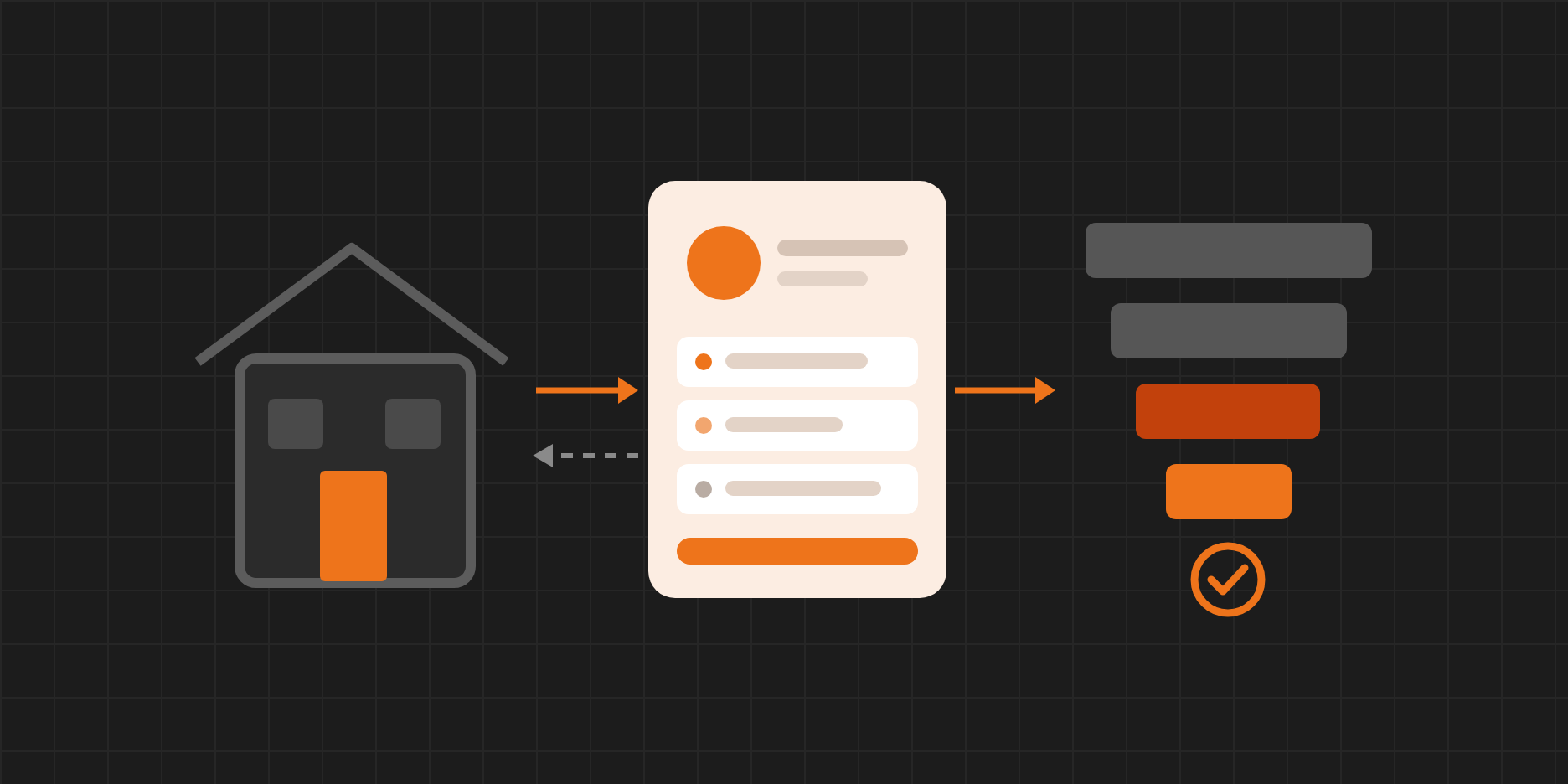
- Real estate CRM software keeps leads, contacts, deals and follow-up in one system.
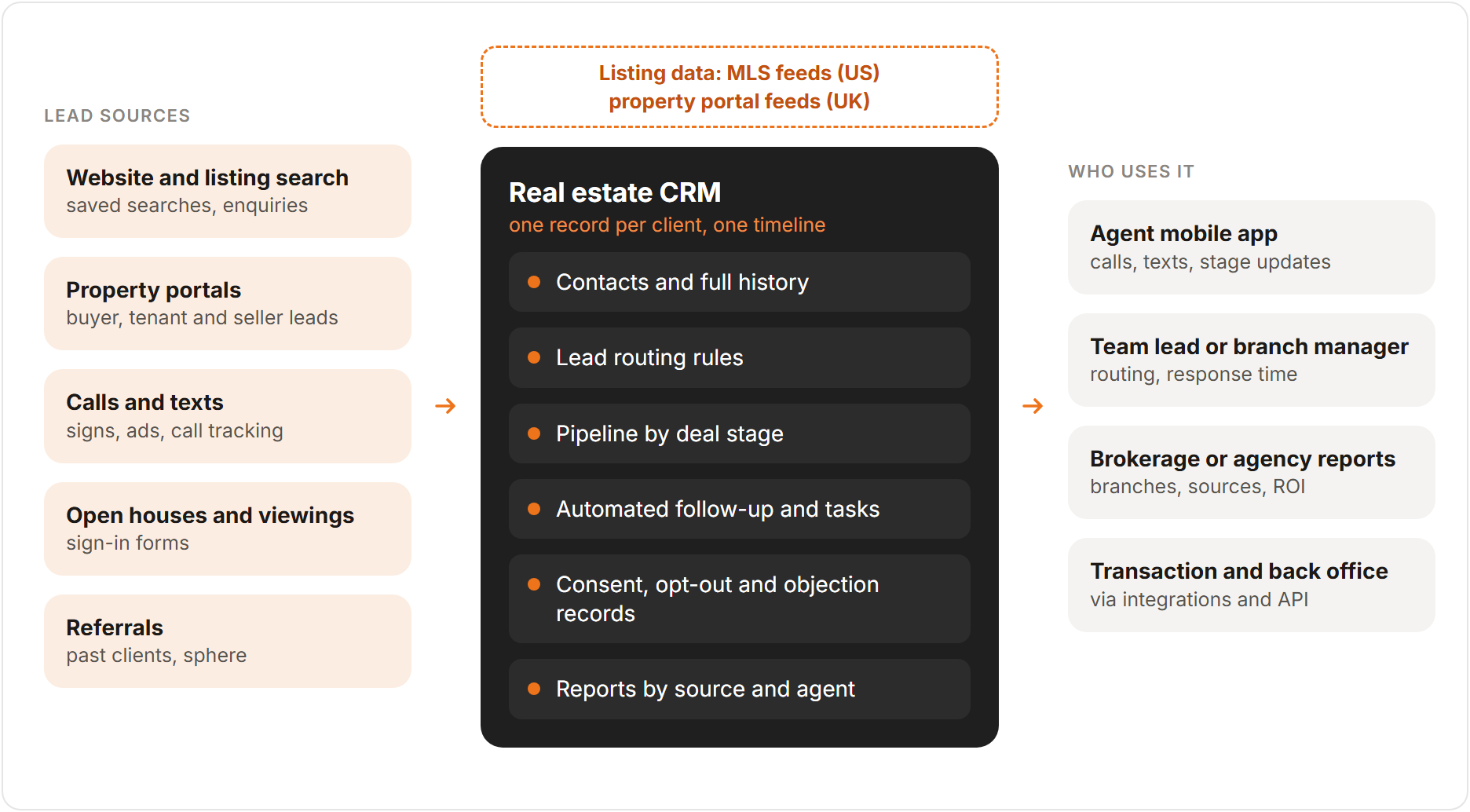
- Key features: lead capture and routing, pipeline, automated follow-up, calls, SMS and email, listing integrations (MLS/IDX in the US, property portals in the UK), reporting and a mobile app.
- Most feature lists skip marketing compliance and ownership of your contact data.
- Rule out vendors that miss mandatory needs, then compare the rest with a weighted scorecard and a two-year cost estimate.
Introduction
Every agent and brokerage collects contacts: portal inquiries, open-house sign-ins, calls from yard signs, referrals from past clients. A real estate CRM keeps those contacts, the conversations around them and the deals they turn into in one system, so follow-up does not depend on someone remembering to call back.
The tool is already common in the industry. In the NAR 2025 Technology Survey, CRM ranked second among the technologies Realtors named as most effective for lead generation, chosen by 23% of respondents, after social media. The figure reflects what 1,241 respondents reported in July 2025, not a measured result of CRM use.
This guide covers CRM selection for US and UK real estate businesses, highlighting where listing integrations, marketing permissions and data protection requirements differ. It walks through the core features of real estate CRM software, compliance and data ownership, a weighted scorecard for vendor demos and the signs that an off-the-shelf product is no longer enough.
What Is a Real Estate CRM
A real estate CRM is customer relationship management software configured for property sales and leasing. It brings contacts, conversations, opportunities and follow-up tasks into one system.
Compared with a general-purpose sales CRM, a real estate CRM may add property records, listing connections and transaction-specific workflows. In practice, real estate customer relationship management software differs in three ways:
- The records are different. Besides contacts and deals, it works with listings, viewings or showings, properties a buyer saved and transaction milestones such as inspection, survey or closing.
- Listing data comes from outside. In the US, listings come from the local multiple listing service (MLS). UK estate agencies publish listings to property portals and their own websites.
- Relationships are long. A buyer can stay in the database for months before they are ready, and past clients come back as referrals years later.
Solo agents use a CRM to keep their sphere of influence and follow-up in one place. Teams use it to share and route leads. Brokerages and estate agencies with sales and lettings departments need oversight of many agents, branches and lead sources, while property managers and developers track leasing and pre-sale inquiries. When none of the packaged products fit the workflow, companies turn to real estate software development to build or extend the system around their own process.
Key Features of Real Estate CRM Software
The real estate CRM features below appear in most products on the market, but their depth varies a lot between vendors. For each one, here is what it should do and what to check during a demo.
Lead capture and routing
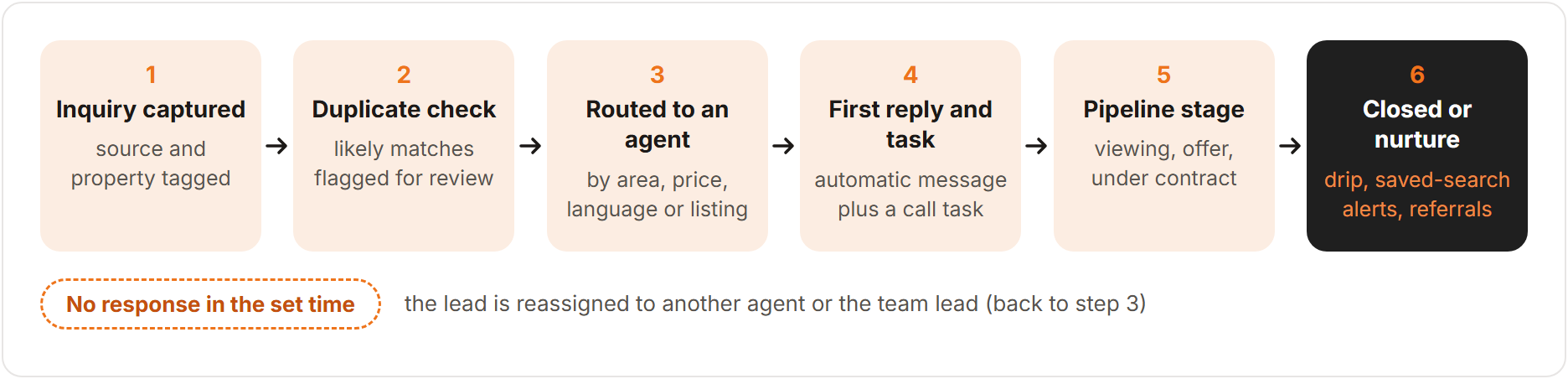
Good real estate lead management software pulls inquiries in automatically from your website, listing search, property portals, landing pages, call tracking and open-house forms. Each lead should arrive with its source and the property it asked about. The CRM should detect likely duplicates and support controlled merging. Preserve the original lead sources, activity history and consent records, and let an authorized user review uncertain matches.
Routing decides who gets the lead. Common rules are round robin, assignment by area, price range or language, or to the listing agent. Teams also need a fallback: if the agent does not respond within a set time, the lead moves to someone else.
Contacts and pipeline
The contact record should show the full history in one timeline: inquiries, calls, texts, emails, notes, saved searches and viewings. Tags and custom fields split the database into buyers, sellers, renters, landlords, investors and past clients.
The pipeline shows deals by stage, for example new lead, active, viewing, offer, under contract and closed. Buyers, sellers and lettings usually need separate pipelines because their stages differ. Ask the vendor whether you can rename stages and add your own without moving to a higher plan.
Automated follow-up and triggers
Real estate CRM automation covers drip campaigns, task reminders and triggers. A trigger starts an action when something happens: a lead views the same listing several times, a new listing matches a saved search, the price drops on a property the buyer saved, or a contract deadline is approaching. Good automation also creates tasks for the agent, so the personal call still happens.
In the demo, check whether follow-up pauses when a lead replies and whether opt-outs suppress the relevant campaigns across agents and connected tools. The CRM should distinguish email preferences from call and text consent.
Calls, SMS and email in one place
The CRM should let agents call, text and email from the contact record. Ask whether business numbers and supported calling integrations keep call metadata, messages and agent notes in the contact timeline. If audio recording is required, evaluate it separately, including the applicable consent settings. Consent and opt-out records belong here too, as described in the compliance section below.
Listing integrations: MLS/IDX in the US and property portals in the UK
In the US, MLS feeds provide authorized listing data. IDX supports its permitted display on eligible websites; capturing inquiries and syncing search activity to the CRM require additional integration. The RESO Web API is the modern standard for MLS data transport, replacing the older RETS protocol. Access runs through the local MLS: you agree to its data use and licensing policies and receive credentials from that MLS or its technology provider, so coverage differs by market.
For UK estate agencies, check supported feeds to the property portals you use, website synchronization and enquiry capture. Rightmove, for example, publishes its own data feed specifications for software providers. Ask the vendor to demonstrate listing updates, withdrawals and lead routing, and confirm portal onboarding, commercial terms and any additional fees. A branded listing search beyond what the CRM offers is a separate project in real estate portal development.
Reporting and ROI tracking
Reports should show which lead sources bring closed deals, how fast agents respond, how many leads each agent converts and what the pipeline is worth. Lead-source ROI is reliable only if the CRM keeps the original source through to closing and you record what each source costs. Check filters by agent, team and branch, and data export.
Mobile app
Agents spend much of the day at viewings and showings, so the mobile app should let them see a contact's history, log a call, reply to a text, update a deal stage and receive new-lead alerts. Check whether it has the same functions as the web version. Businesses that want a branded app for buyers, sellers and tenants usually look at real estate app development as a separate product.
AI features
AI is now part of many real estate CRMs: drafting emails and texts, summarizing call notes, scoring leads by readiness and suggesting the next step. Agents already use these tools: according to the NAR 2025 survey, 20% of responding Realtors use AI daily and 22% weekly.
The limits matter as much as the features. AI drafts need human review, especially when they describe a property, a price or a neighborhood. A lead score is only as good as its data, so ask which signals it uses and whether agents can see why a lead ranked high. Also ask whether your contacts are used to train the vendor's models and whether AI can be switched off.
Integrations and API
Typical connections include listing feeds, your website, calendar and email, e-signature, transaction or property management tools and accounting. A documented API connects the systems the vendor does not support out of the box, and our glossary explains how API integration works. Ask for the API documentation before you sign and check whether API access costs extra.
The table below summarizes what to test in each area.
| Feature | What to check in the demo | Red flag |
|---|---|---|
| Lead capture and routing | Send a test inquiry from your website and from a portal, then see where it lands and how fast | Leads arrive without a source, or duplicates merge without review |
| Contacts and pipeline | Rename a stage and add a custom field | Stages are fixed or editable only on the top plan |
| Automated follow-up | Reply to a drip message as if you were the lead | Follow-up continues after a reply, or opt-outs are not applied to the relevant campaigns |
| Calls, SMS and email | Log a call and a text from the mobile app | Call and message activity is missing from the shared contact timeline |
| Listing and portal integrations | Ask about your MLS or the portals you use by name | Your market or portal is listed as "coming soon" |
| Reporting and ROI | Build a report from lead source to closed deal | The original lead source is overwritten by later activity |
| Mobile app | Update a deal stage during a viewing | Key functions work only on desktop |
| AI features | Ask which data a lead score uses | No explanation of scores and no opt-out from model training |
| Integrations and API | Request the API documentation | No public API, or API access only on enterprise plans |
Compliance Features Your CRM Should Support
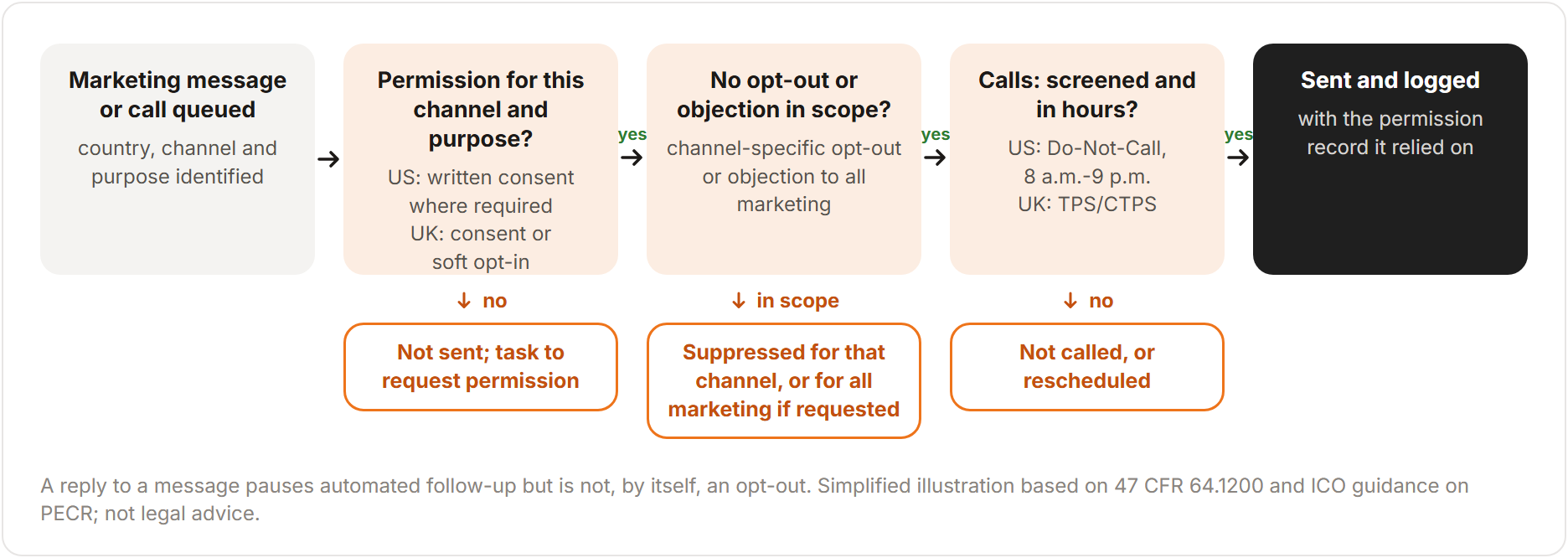
Outreach requirements depend on the recipient's location, communication channel and the purpose of the message. The sections below cover selected US and UK requirements. A CRM should support the applicable controls, but software alone does not make a business compliant. This section is for information only and is not legal advice, so review your process with a lawyer.
Across both markets, real estate CRM compliance starts with distinguishing a reply from an opt-out. A reply may pause automated follow-up, while a withdrawal of consent or marketing objection must be applied according to its scope and the applicable rules. Record whether the person is refusing a particular channel or all direct marketing, and synchronize that preference across the relevant agents, branches and connected tools.
US: TCPA, Do-Not-Call and CAN-SPAM
Under the FCC's telemarketing rules in 47 CFR 64.1200, marketing calls and texts to mobile numbers made with an automatic telephone dialing system (ATDS) or an artificial or prerecorded voice require the recipient's prior express written consent. ATDS is a legal term, and not every automated CRM feature falls under it. Numbers on the National Do-Not-Call Registry may not receive telephone solicitations, with limited exceptions, and solicitation calls to residential numbers are allowed only between 8 a.m. and 9 p.m. in the called person's local time. A person can revoke consent by any reasonable method, including a reply such as "stop," "cancel" or "unsubscribe" to a text.
The FCC has published changes to its consent-revocation rules with an effective date of November 25, 2026, so check the current text of the rule before you configure revocation handling.
NAR's TCPA best practices one-sheet adds that the FCC's "one-to-one consent" rule did not take effect. NAR notes that live marketing calls made without a qualifying autodialer or artificial voice can fall outside the federal prior express written consent requirement, while Do-Not-Call restrictions still apply. Its recommended practices include obtaining written consent, maintaining a written policy and training agents.
For email, the FTC's CAN-SPAM compliance guide requires accurate header information, a subject line that reflects the content, a clear statement that the message is an ad, a valid physical postal address and a clear way to opt out. Opt-out requests must be honored within 10 business days, and each email that violates the law can bring a penalty of up to $53,088. The rules cover all commercial email, including business-to-business messages.
UK: PECR, UK GDPR and marketing preferences
UK estate agents should evaluate marketing controls against PECR and the UK GDPR. For unsolicited marketing emails and texts to individual subscribers, PECR generally requires consent unless all conditions of an applicable soft opt-in are met. For the products-and-services soft opt-in, the business must collect the details directly during a sale or negotiations for a sale, market its own similar services, and offer an opt-out both when collecting the details and in every message, as the ICO's electronic mail marketing guidance explains.
Rules differ for corporate subscribers. Sole traders and some partnerships are treated as individual subscribers, so a business email address alone does not establish which rules apply.
For live marketing calls, the CRM should support screening against the TPS, CTPS and internal suppression lists, with evidence of any permission relied on. Automated marketing calls that play recorded messages require specific consent, according to the ICO's telephone marketing guidance.
Where personal data is used, record the applicable UK GDPR lawful basis and respect objections to direct marketing. Legitimate interests cannot replace consent where PECR requires it.
| Requirement | What the CRM should do |
|---|---|
| US: prior express written consent for marketing calls and texts made with an ATDS or artificial or prerecorded voice | Store consent with date, source, wording and phone number, and block those campaigns to numbers without it |
| US: National Do-Not-Call Registry and internal do-not-call list | Check numbers against both lists before calls and texts go out |
| US: calling hours, 8 a.m. to 9 p.m. local time | Schedule calls and texts by the contact's time zone |
| US and UK: opt-outs and revocation of consent | Record the scope of each opt-out, apply it across the relevant campaigns and senders, and honor requests to stop all marketing |
| US: CAN-SPAM opt-out within 10 business days | Offer a simple unsubscribe and keep an email suppression list shared by every agent and sender |
| US: sender identification and postal address | Use email templates with required footer fields that agents cannot remove |
| UK: PECR email and SMS permissions | Store consent or evidence supporting the applicable soft opt-in, including collection details and opt-out opportunities |
| UK: subscriber classification | Distinguish individual and corporate subscribers |
| UK: TPS/CTPS screening | Support screening, retain results and record any permission relied on |
| UK: UK GDPR direct marketing objections | Record objections and suppress the relevant processing across connected systems |
| US and UK: proof for audits | Log who sent what, when, and on which consent or permission record |
Data Ownership, Security and Migration
Your contact database is the most valuable thing a CRM holds. Before signing, read what the contract says about who owns that data and how you get it back.
- Ownership. The contract should state that the brokerage, agency or agent owns contact and activity data. For teams, agree in advance who keeps which contacts when an agent leaves.
- Export. Ask for a full export in standard formats, such as CSV or through the API, that includes notes, call and message history, tags and consent records, not only names and emails.
- Migration. Moving from spreadsheets or another CRM takes cleanup: mapping fields, keeping the original lead sources and reviewing duplicates. A matching phone number or email does not always mean the same person, so uncertain matches need a human check. Ask who does this work and how it is priced.
- Exit terms. Check notice periods, how long data stays available after cancellation and whether an export costs extra.
- Security and data protection. Ask about encryption, role-based access, two-factor authentication, audit logs, backups, retention settings and where the data is hosted. Our glossary page on data privacy and protection covers the basics worth raising with vendors.
How to Choose Real Estate CRM Software: A Scorecard
First, eliminate vendors that fail your mandatory requirements, such as required listing integrations, access controls, marketing permissions or a usable data export. Use weighted scoring only to compare vendors that pass those checks.
Then score each remaining vendor from 1 to 5 on every criterion during the demo. With weights totaling 100, calculate the weighted average as Σ(weight x score) ÷ 100. The result is a score from 1 to 5.
| Criterion | Weight | Demo question | Score (1-5) |
|---|---|---|---|
| Lead capture and routing | 20 | Can you route a live test lead from our website and a portal to the right agent? | |
| Follow-up automation | 15 | Show a drip campaign that pauses on a reply and respects the scope of an opt-out. | |
| Listing and portal integrations | 15 | Which listing sources and property portals do you support in our market, and how are updates and enquiries synchronized? | |
| Compliance tools | 15 | Where are consent, permissions and objections stored, and how are they applied across channels? | |
| Data ownership and export | 10 | Show a full export that includes notes and consent history. | |
| Reporting | 10 | Build a report from lead source to closed deal for last quarter. | |
| Mobile app | 5 | Update a deal and log a call from a phone. | |
| Integrations and API | 5 | Share the API documentation and list the integrations we use. | |
| Total cost of ownership | 5 | What will we pay in year one and year two with all add-ons? | |
| Total | 100 |
These weights are a starting point. A solo agent may give more weight to the mobile app and price, while a brokerage or multi-branch agency usually puts routing, reporting and compliance first.
Solo agent, team or brokerage
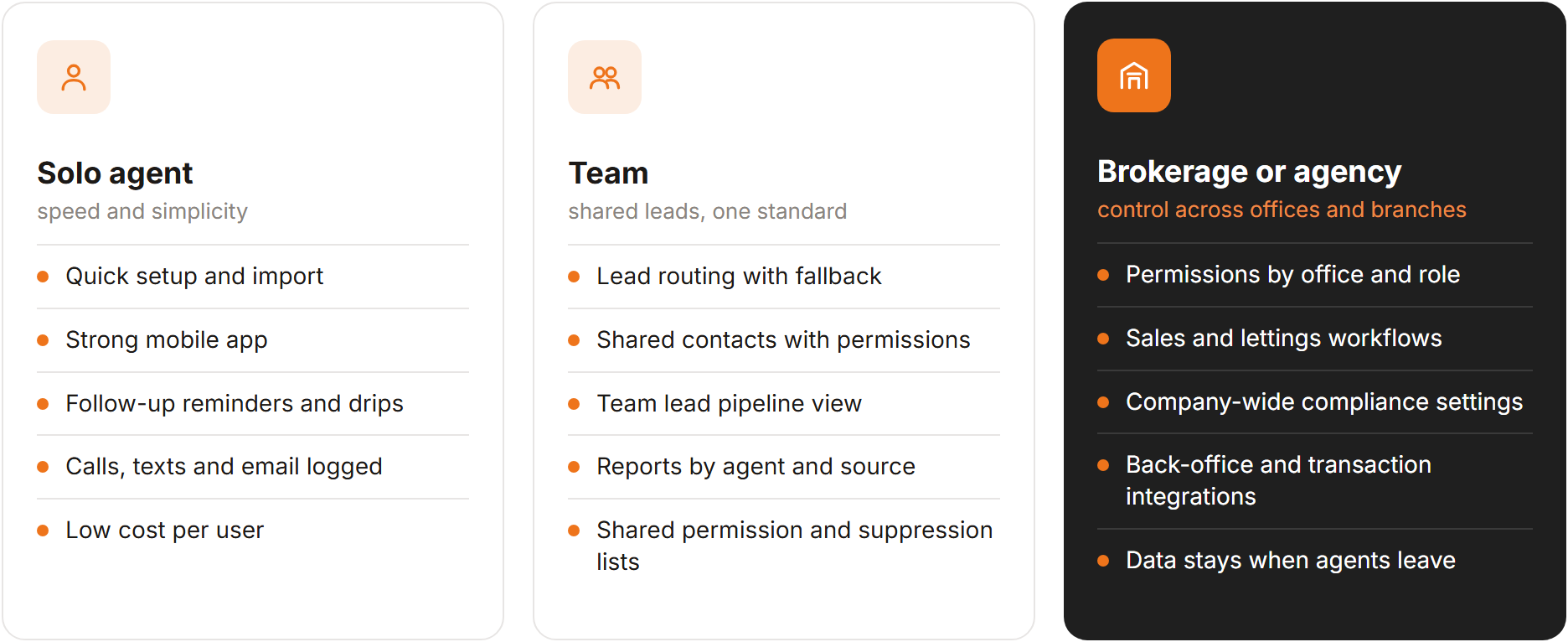
A real estate CRM for agents who work alone should be quick to set up, strong on mobile and follow-up, and affordable. Teams need shared leads, routing rules, a team lead view and reporting by agent. Brokerages and estate agencies add permissions across offices or branches, agent onboarding, company-wide compliance settings, separate sales and lettings workflows and integration with back-office and transaction systems.
Pricing and total cost of ownership
Real estate CRM pricing usually starts with a fee per user per month, with features split across plans. A first-year budget should also cover higher plans needed for routing or API access, add-ons such as listing websites, dialers, texting credits and AI, data migration, integrations and training. Ask each vendor for a written two-year quote for your team size and compare totals, not headline prices.
When an Off-the-Shelf CRM Is Not Enough
Packaged CRMs work well for standard agent workflows. These are the signs that a business has outgrown one:
- Staff re-enter the same client and property data in the CRM, a property management system, an investor portal and a transaction tool.
- The process does not fit the vendor's records, for example when you sell new-build units in phases, run sales and lettings together, or track investors alongside buyers.
- You need a listing source, portal or data feed the vendor does not support.
- Per-user fees grow faster than the value as the team grows.
- Every month, someone exports data to spreadsheets to build the reports management needs.
The answer is not always a new system. Often it is enough to connect the existing CRM to other tools through its API or to add a custom module around it. When the gaps are in the core workflow, custom real estate software can give you greater control over workflows, integrations and export. Confirm ownership of bespoke code, repository access and handover terms in the contract; third-party components and listing data remain subject to their licenses.
FAQ
At a minimum, a real estate CRM should capture leads from all your sources and route them to the right agent. It should also keep each contact's full history, show deals in a pipeline and automate follow-up.
Beyond that, look for calls, SMS and email inside the CRM, listing integrations for your market, source-to-close reporting and a mobile app with the main functions. Consent and opt-out records, full data export and an open API protect you later, when rules change or you switch systems.
For most agents and teams, the most important feature is lead capture with fast routing and follow-up. A CRM full of contacts brings little value if new inquiries wait hours for a reply or get lost between agents.
Test it with a real inquiry during the demo. Submit a lead from your website and a portal, then check that it arrives with its source, reaches the right agent and starts a follow-up task automatically. Also check what happens when the agent does not respond: the lead should move on instead of waiting.
You need MLS/IDX connectivity when your US workflow depends on listing search, listing alerts or buyer activity flowing into the CRM. It may be provided through the CRM, your website platform or another integration; it does not always need to be native to the CRM.
For UK estate agencies, evaluate the property portal feeds, website connections and enquiry integrations your team actually uses. In both markets, ask vendors to show the exact listing sources they support today.
The TCPA applies to the business that sends the texts, but the CRM is where the controls live. Under 47 CFR 64.1200, marketing texts to mobile numbers sent with an ATDS require prior express written consent, and recipients can revoke it by replying "stop" or by any other reasonable method.
Real estate CRM compliance features therefore matter: the system should store consent records, check do-not-call lists, respect calling hours and apply opt-outs to the relevant campaigns. Review your setup with a lawyer, because the FCC's revocation rules have changes effective November 25, 2026.
Look for channel-specific marketing permissions, consent records, evidence supporting any soft opt-in, TPS/CTPS screening and shared suppression lists. The CRM should also support UK GDPR requirements, including access controls, retention settings and handling objections to direct marketing.
Ask the vendor to demonstrate how these controls work across agents, branches and connected marketing tools. If a person objects to all direct marketing during a phone conversation, record that broader objection and apply it across channels. If they request only that marketing calls stop, record and apply that narrower preference.
Teams need lead routing with clear rules and fallbacks, shared contacts with permissions, and a view for the team lead to see every agent's pipeline. Reporting by agent and by lead source shows who converts and which sources pay off.
Teams also need stricter control over outreach. Consent, opt-out and objection records have to apply to every agent who contacts a lead, and the data should stay with the team or agency when an agent leaves.
Next Step
Need an integration or a CRM built around your brokerage workflows? Use our estimator for an initial development estimate, or book a call to discuss the best approach.