

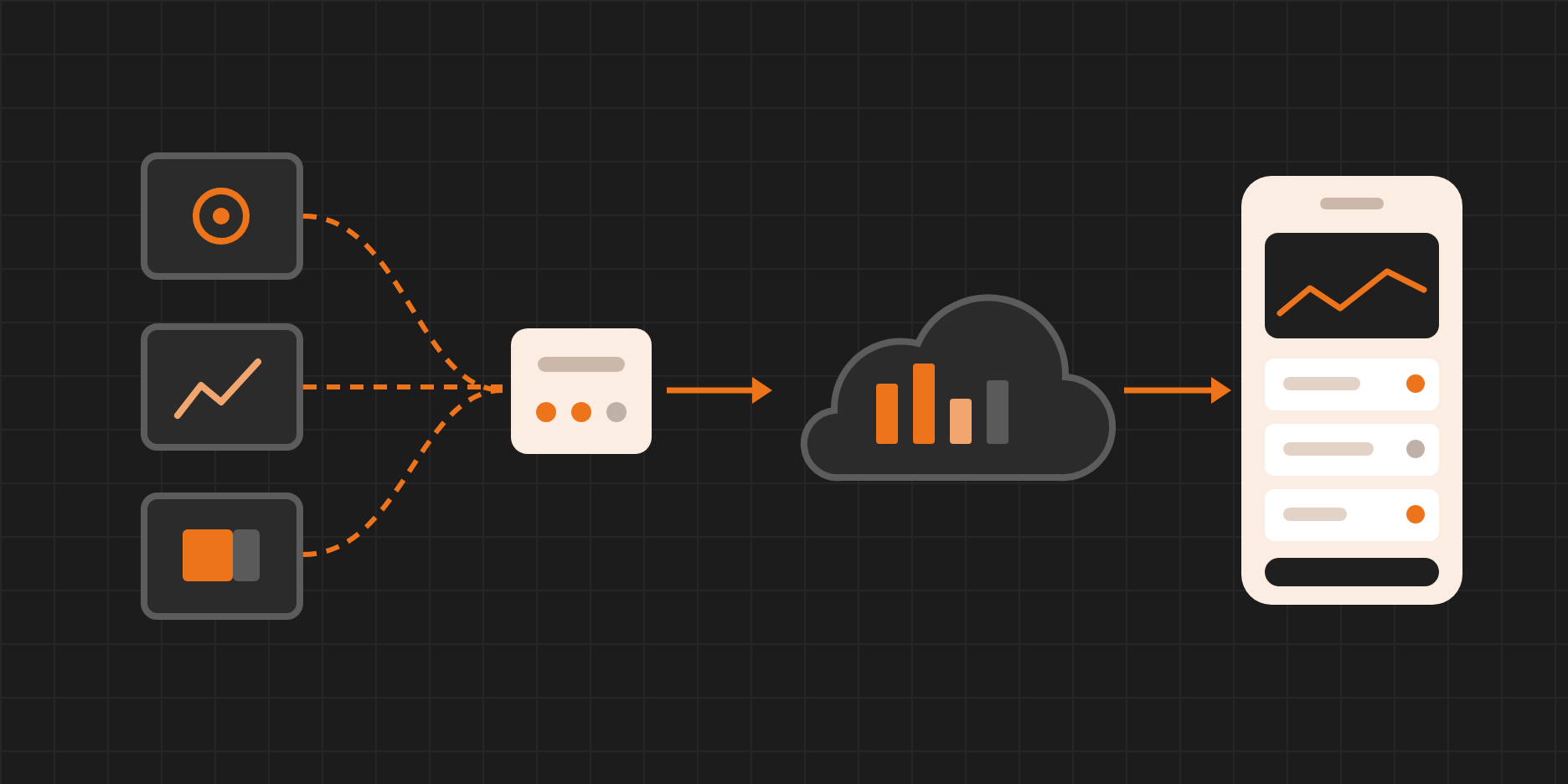
- IoT app development is building the software around connected devices: device integration, connectivity, a cloud backend and the mobile and web apps people use.
- It differs from ordinary app development because of hardware, unreliable networks, protocols, device security and over-the-air updates.
- Platform choice and security rules now shape the project from the first sprint, so plan them before writing code.
What Is IoT App Development?
What is IoT app development? It is the work of building software that collects data from connected devices, sends commands back to them and presents the results to people. A typical deployment includes devices, connectivity, backend services and user interfaces. Backend processing may run in the cloud, at the edge or across both.
The term IoT-enabled app development is sometimes used for the same work, especially when an existing product, such as a field service app or a building management portal, gains connected devices. In both cases, the app is only as good as the data and control path behind it.
An IoT app differs from a regular mobile app in a few ways. It talks to hardware that may be offline, low on battery or running old firmware. It handles a steady stream of readings rather than occasional user actions. It has to prove that each device is genuine, and it has to update software on devices that are already in the field. These constraints shape the architecture long before anyone designs a screen.
IoT Analytics' State of Enterprise IoT 2026 report estimates that connected IoT devices reached 21.1 billion by the end of 2025. This provides context for the market's scale; it does not determine whether an individual business needs a custom app. That decision depends on the workflow, the product and the economics of each case. When a business needs one app for its own devices, users and data, custom IoT application development is often the route that keeps those pieces together.
How an IoT App Works: Architecture
Most IoT apps follow a layered architecture. The four-layer model below is common, but it is not the only one: some teams describe three layers (devices, network, application), and others use five, adding separate processing and business layers. The labels matter less than knowing which team owns each layer and how data moves between them.
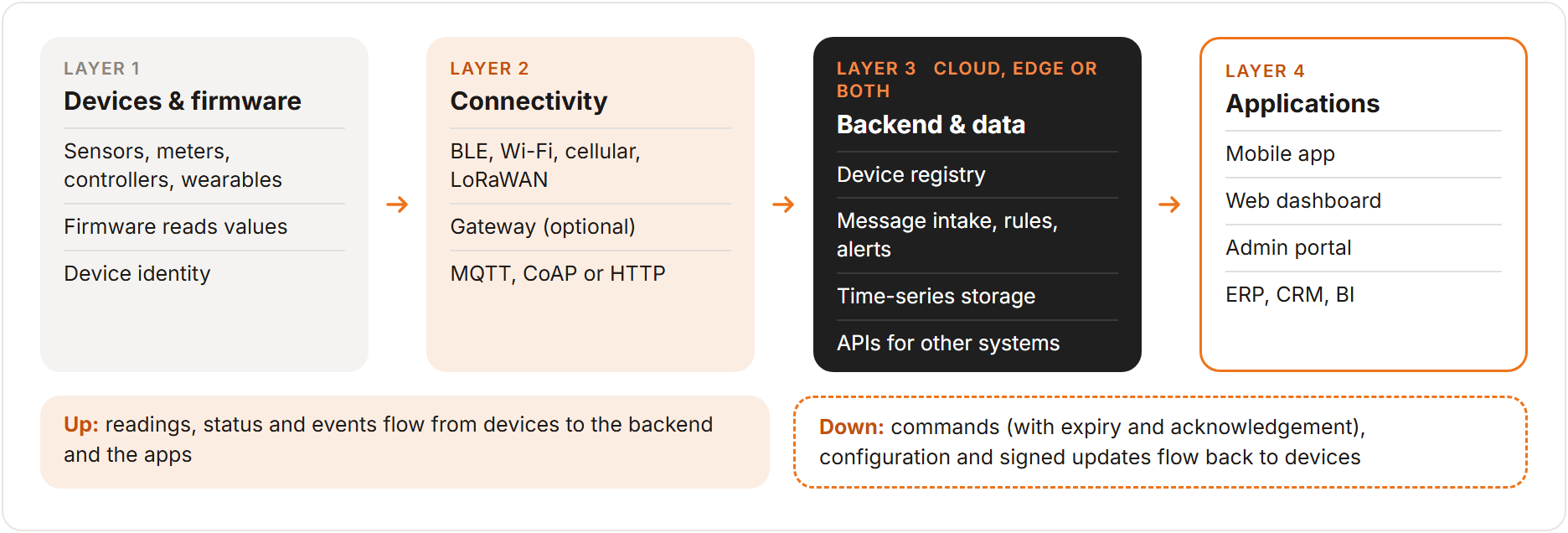
- Devices and firmware. Sensors, controllers, meters or wearables, with firmware that reads values, applies basic logic and talks to the network. Some devices connect directly to the internet; others use a local gateway.
- Connectivity and protocols. The radio or wired link (BLE, Wi-Fi, cellular, LoRaWAN, NB-IoT, Ethernet) and the messaging protocol on top of it.
- Cloud backend and data. A device registry, message intake, a rules engine, time-series storage and APIs for other systems. This is where device identity, alerts and history live.
- Application layer. Mobile apps, web dashboards and admin portals for operators, customers and support teams, plus integrations with ERP, CRM or BI tools.
Data flows up from devices to apps, and commands, configuration and firmware updates flow down. The downward path needs as much care as the upward one, because a wrong command or a failed update can take a device offline in a place no one can reach easily.
Connectivity and protocols
The protocol choice depends on the device, the network and how the data will be used. Three common application-layer choices are MQTT, CoAP and HTTP. Industrial and sector-specific systems may require additional protocols.
MQTT is an OASIS Standard. Version 5.0 was approved on 7 March 2019. It is a client/server publish/subscribe protocol, lightweight and designed for constrained environments where code size or bandwidth is limited. Devices publish messages to topics on a broker, and other clients subscribe to them. MQTT offers three delivery levels: at most once, at least once and exactly once. MQTT QoS describes protocol-level delivery. It does not, by itself, guarantee that a business operation or physical command is executed exactly once; application-level acknowledgements and duplicate handling may still be required. MQTT runs over TCP/IP, so sleeping devices need an appropriate reconnect and session strategy.
CoAP, defined in IETF RFC 7252, is a web transfer protocol for constrained nodes and low-power, lossy networks. It uses a request/response model similar to HTTP, with URIs and media types, which makes it easier to bridge to web services. It fits battery devices that wake up, send a reading and go back to sleep.
HTTP is the simplest option when a device has enough power and a stable connection, or when it sends data only occasionally. HTTP is widely supported by cloud and web tooling, but each request carries more overhead than an MQTT message, and the device cannot easily receive commands unless it polls the server.
| Protocol | Model | Good fit | Trade-off |
|---|---|---|---|
| MQTT | Publish/subscribe through a broker | Frequent telemetry, two-way commands, many devices | Requires a broker and connection management; sleeping devices need an appropriate reconnect and session strategy |
| CoAP | Request/response over UDP | Battery devices on constrained, lossy networks | Fewer managed cloud services support it directly |
| HTTP | Request/response | Occasional uploads, powerful devices, quick integration | More overhead per message; commands need polling or a separate channel |
Many systems combine protocols. A sensor may speak BLE to a gateway, the gateway may use MQTT to the cloud, and the mobile app may call the backend over HTTPS.
IoT Mobile App Development: iOS, Android and Cross-Platform
Mobile app development for IoT adds work that a standard app does not have: finding and pairing devices, keeping a connection alive in the background, handling devices that drop off and telling users what happened. The mobile app is often the first thing a customer touches after unboxing a device, so setup problems turn into support tickets and poor reviews quickly.
How IoT changes mobile app development
IoT in mobile app development shows up in four areas. The first is onboarding: scanning a QR code, pairing over Bluetooth Low Energy (BLE), passing Wi-Fi credentials to the device and registering it in the cloud. The second is background behavior: the app may need to receive data or alerts when it is not on screen, within the limits each operating system sets. The third is offline handling. Show the last known device state with its timestamp and connection status. Queue only commands that are safe to defer, with expiry times, unique identifiers and checks against the current device state. Clearly distinguish pending, acknowledged, executed and failed commands. The fourth is notifications: push alerts for thresholds, faults or finished jobs.
The impact of IoT on mobile app development is also visible in testing. Simulators do not reproduce radio conditions, so teams need a set of real phones and real devices, including older models and firmware versions.
Android
Android app development for IoT starts with permissions. According to Android's Bluetooth permissions guide, apps targeting Android 12 (API level 31) or higher declare BLUETOOTH_SCAN to find devices, BLUETOOTH_CONNECT to talk to paired devices and BLUETOOTH_ADVERTISE to make the phone discoverable. The app declares only the permissions its features use, and these are runtime permissions that the user grants. The same guide notes that on Android 8.0 (API level 26) and later, the Companion Device Manager can pair with nearby devices on the app's behalf without location permission.
Android app development with IoT integration also has to account for device fragmentation: Bluetooth stacks and battery management differ between manufacturers, so a pairing flow that works on one phone may fail on another. A representative test matrix helps expose device-specific issues before launch.
iOS
iOS app development for IoT relies on the Core Bluetooth framework for BLE devices. Apple's Core Bluetooth background processing guide explains that an app communicating with BLE peripherals declares the bluetooth-central background execution mode, and the system then wakes the app to handle Bluetooth events, which matters for devices such as heart rate monitors that send data at regular intervals.
For iOS IoT app development, plan for the limits of background execution. Background Bluetooth activity and push delivery are subject to operating-system and network constraints. Use cloud notifications when a reliable device-to-cloud path exists, but do not treat push as a guaranteed channel for safety-critical alerts. Define local detection, fallback behavior and escalation according to the product's risk.
Cross-platform: Flutter and React Native
Flutter and React Native let one team ship iOS and Android apps from a shared codebase, which works well for dashboards, settings and account screens. Bluetooth, background tasks and device provisioning still depend on native APIs, reached through plugins or native modules. Before you choose, check that the plugins you need are maintained and support current OS versions, and budget time for native code where they fall short. Our comparison of React Native vs Kotlin covers the trade-offs between cross-platform and native Android development in more detail.
IoT Platforms and Cloud: What to Choose
An IoT app development platform gives you ready-made device connectivity, a registry, security credentials and message routing, so your team builds the application on top instead of writing that plumbing. The alternative is your own backend, built on general cloud infrastructure with an open-source broker and your own device registry.
A managed platform shortens the path to a working pilot and handles scale, but it ties you to one vendor's services, pricing and roadmap. Your own backend gives more control over data, costs and protocols, and it needs a team to run and secure it. Many projects use a middle path: a managed connectivity service for devices, and custom services for business logic, data and apps.
Platform roadmaps change, and several IoT services have been retired in recent years. Check the current status of every service in vendor documentation before you commit, and design the backend so that the connectivity layer can be replaced.
| Service | Status (checked in vendor documentation) | What to check |
|---|---|---|
| Google Cloud IoT Core | Retired on 16 August 2023 | Do not plan new work on it; projects moved to other services |
| AWS IoT Analytics | Full shutdown; end of support 15 December 2025 | Move analytics to other AWS data services or your own pipeline |
| AWS IoT Events | Full shutdown; end of support 20 May 2026 | Rebuild detector logic as rules or your own services |
| AWS IoT Greengrass V1 | Full shutdown; end of support 7 October 2026 | Edge workloads need to run on a current runtime |
| Azure IoT Central | No new applications from 23 September 2026; existing apps work until 20 September 2029 | Microsoft recommends moving to IoT Hub, Device Provisioning Service and Microsoft Fabric |
| AWS IoT Core and Azure IoT Hub | Available; core connectivity services of each cloud | Pricing model, limits, protocol support and data residency |
IoT App Development Process: Step by Step
The process below outlines seven common stages of an IoT app project. Activities overlap, and security, testing and device validation continue throughout delivery. For each step, the table at the end lists the output, the people involved and the mistake we see most often.
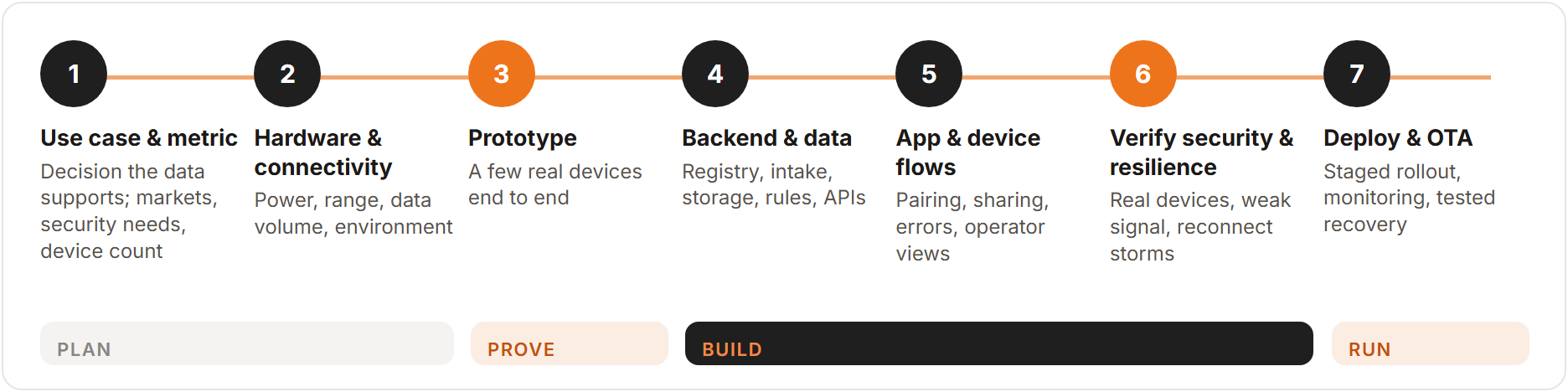
1. Define the use case and the success metric
Start with the decision the data should support: which fault to catch, which cost to cut, which task to remove for a technician. Write down the metric that will show the project works, such as fewer site visits or faster fault detection, and the number of devices you expect in year one and later. Identify target markets, security and privacy requirements, misuse scenarios and responsibility for device, app and cloud security before selecting the architecture.
2. Choose hardware and connectivity
Pick devices, sensors and the network based on power, range, data volume and the environment. A battery sensor in a basement needs different connectivity than a powered controller in an office. If you build your own hardware, the firmware team joins here; if you buy devices, check their protocols, APIs and update support.
3. Build a prototype or proof of concept
Connect a few real devices end to end: device, network, backend and a simple screen. The aim is to test the riskiest assumptions, such as whether the signal reaches, whether the battery lasts and whether the readings are accurate, before investing in polished apps.
4. Build the backend and data pipeline
Set up device identity and the registry, message intake, storage for time-series data, rules and alerts, and APIs. Handle duplicate and out-of-order messages explicitly. Preserve event timestamps and define how the system reconciles state after reconnection. Decide how long raw data is kept, how it is aggregated and which systems receive it. This is where a pilot design often needs rework before scaling from ten devices to thousands.
5. Design the app and the device flows
IoT app design and development covers more than screens. Map the flows that involve the device: unboxing and pairing, adding a device to a site or account, sharing access, firmware updates, error states and replacing a broken unit. Then design the operator views: lists and maps of devices, live status, alerts and history. Each flow needs a clear message when the device is offline.
6. Verify security and resilience with real devices
Verify the authentication, access controls, encrypted connections and update protections designed into earlier stages. Test with real hardware under weak signal, power loss, firmware mismatches and reconnect storms. Load tests should simulate the expected device count, not only user traffic.
7. Deploy, monitor and update over the air
Roll out devices and apps in stages, monitor device health and data quality, and set up over-the-air (OTA) updates. Plan signed updates, compatibility checks, staged deployment and recovery from interrupted installation. Where supported, use a known-good image or another tested recovery mechanism. Define how recovery works without allowing an unauthorized downgrade to vulnerable firmware. Plan support processes for devices that go offline or need replacement.
| Step | Output | Who is involved | Typical mistake |
|---|---|---|---|
| Use case and metric | Problem statement, success metric, device count forecast | Product owner, operations, IoT architect | Starting with a device instead of a problem |
| Hardware and connectivity | Device and network choice, data budget | Hardware or firmware team, IoT architect | Ignoring power, range or the install environment |
| Prototype | Working end-to-end path on a few devices | Firmware, backend and mobile developers | Treating the prototype as production code |
| Backend and data | Registry, intake, storage, rules, APIs | Backend and DevOps engineers | Designing for the pilot size only |
| Design the app and device flows | Onboarding, operator and error flows | UX designer, mobile and web developers | Designing only for the happy path |
| Verify security and resilience | Verification of controls built in earlier stages; test results on real devices | QA, security and firmware engineers | Testing only in simulators |
| Deploy, monitor and OTA | Rollout plan, monitoring, update process | DevOps, support, firmware team | No tested recovery for failed or interrupted updates |
Security and Compliance for IoT Apps
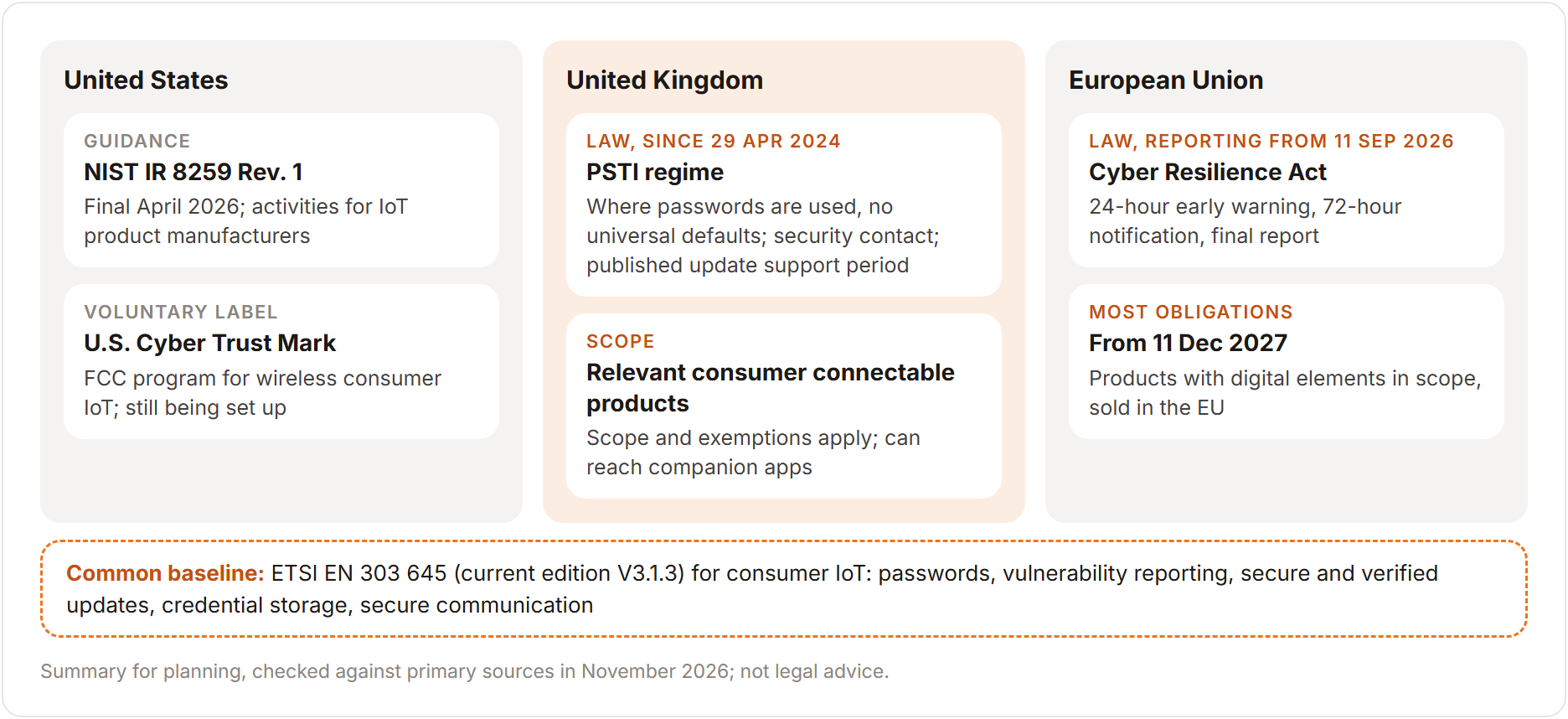
Security rules for connected products now differ by market, and some of them reach the companion app and the cloud service, not only the device. The checklist below links each requirement to what it means for the app team. These are summaries for planning; confirm which rules apply to your product with legal counsel.
United States
NIST IR 8259 Rev. 1, Foundational Cybersecurity Activities for IoT Product Manufacturers, was published as final in April 2026 and supersedes the 2020 edition. It describes cybersecurity activities manufacturers should consider before their IoT products are sold, so that products offer the security functions and information their customers need. It is guidance, not a law.
The U.S. Cyber Trust Mark is a voluntary FCC labeling program for wireless consumer IoT products, based largely on NIST criteria. Labeled products will carry a QR code linking to details such as the support period and whether security updates are automatic. The program excludes FDA-regulated medical devices, products mainly for manufacturing, industrial control or enterprise use, and wired devices. The FCC is still setting up the program and, in October 2026, asked for comments on the label design and post-market surveillance.
United Kingdom
The UK Product Security and Telecommunications Infrastructure (PSTI) regime came into effect on 29 April 2024. It applies to manufacturers, importers and distributors of consumer connectable products. The security requirements in Schedule 1 of the 2023 Regulations cover three areas: where passwords are used, they must be unique per product or defined by the user, so universal or easily guessable default credentials are not allowed; manufacturers must publish a point of contact for reporting security issues; and they must publish the minimum period during which the product will receive security updates. The reporting and support-period requirements also cover software used in connection with the product's intended purpose, which can include its companion app. Products must come with a statement of compliance. PSTI applies to relevant consumer connectable products, subject to its scope and exemptions. It is not a universal compliance regime for every industrial, medical or enterprise IoT system.
The regime draws on ETSI EN 303 645, the European standard for consumer IoT security baseline requirements. The current edition is ETSI EN 303 645 V3.1.3 (September 2024), which also covers secure updates, secure storage of credentials and secure communication. Teams selling in several markets often use it as a common baseline. When mapping PSTI duties, follow the specific provisions and editions the legislation and its guidance refer to: a newer edition of the standard does not automatically become a legal requirement.
European Union
The Cyber Resilience Act, Regulation (EU) 2024/2847, sets cybersecurity requirements for products with digital elements sold in the EU. Under Article 71, most of it applies from 11 December 2027, but the reporting obligations in Article 14 apply from 11 September 2026. Manufacturers must send an early warning about an actively exploited vulnerability or a severe incident within 24 hours of becoming aware of it, and a fuller notification within 72 hours. Reporting also includes a final report: for actively exploited vulnerabilities, no later than 14 days after a corrective measure becomes available; for severe incidents, within one month of the 72-hour notification. The obligations apply to products within the CRA's scope, not to every cloud service, and US and UK companies are affected when they place such products on the EU market.
| Requirement | Source | What it means for the app |
|---|---|---|
| Password requirements, where passwords are used | UK PSTI Schedule 1; ETSI EN 303 645 | No universal or guessable default credentials; onboarding sets or generates them per device, or uses another suitable authentication method |
| Point of contact for security issues | UK PSTI Schedule 1; ETSI EN 303 645 | A published reporting channel and a process to triage reports for device, app and cloud |
| Published security update period | UK PSTI Schedule 1; ETSI EN 303 645 | A stated support period, with the app and backend maintained for that time |
| Secure, verified updates | ETSI EN 303 645; NIST IR 8259 Rev. 1 | Signed updates, compatibility checks, staged rollout and tested recovery; signing alone does not secure the whole update process |
| Device identity and secure communication | ETSI EN 303 645; NIST IR 8259 Rev. 1 | Per-device credentials or certificates and encrypted connections |
| Vulnerability and incident reporting workflow | EU CRA Article 14, from 11 September 2026 | Monitoring, logging and an incident process for 24-hour early warnings, 72-hour notifications and final reports |
| Label information (voluntary) | U.S. Cyber Trust Mark | Support period and update details ready for the product registry |
Product-security requirements do not replace privacy obligations. Where telemetry identifies people or reveals their behavior, assess the applicable data-protection requirements, access controls, retention and third-party processing. Determine any additional sector-specific obligations before design.
No checklist makes a product secure on its own. It gives the team a baseline to design against and evidence to show customers and regulators.
How Much Does IoT App Development Cost?
IoT app development cost depends on more variables than a typical app, because the budget covers devices, connectivity and cloud running costs as well as software. Published price ranges vary widely and rarely state what they include, so a useful estimate starts from the drivers below.
| Cost driver | What increases the cost | What to clarify early |
|---|---|---|
| Number and type of devices | Many device models, custom hardware, old firmware | Device list, protocols and who owns firmware |
| Connectivity | Cellular plans, gateways, mixed networks | Network per site, data volume per device |
| Backend scale | Thousands of devices, high message rates, long retention | Device count forecast, message frequency, retention period |
| Apps | Separate mobile and web apps, many user roles, offline mode | Which users need which app and features |
| Security and compliance | Certificates, signing, audits, market-specific rules | Target markets and required standards |
| Integrations | ERP, CRM, BI, maintenance or billing systems | Systems to connect and their APIs |
| Ongoing costs | Cloud usage, monitoring, support, updates | Support period and who runs the system after launch |
The app side of the budget behaves much like any mobile project; our mobile app development cost breakdown explains how features, platforms and design affect it. For the IoT side, the biggest swings usually come from the device count, the number of device models and how much of the backend a managed platform covers. Budget for running costs from the start: cloud messaging, storage and monitoring grow with every device you add.
A staged budget keeps the risk under control. Fund the proof of concept on a few devices first, then the pilot on one site, and only then the rollout. Each stage gives real data on device behavior, message volume and support load, which makes the next estimate more accurate than any range quoted up front.
IoT App Development by Industry
The same architecture serves very different products. Below is one concrete app feature per industry rather than a long list.
Healthcare and wearables
Healthcare IoT app development often starts with a wearable or home device that sends readings to a phone over BLE and then to a care team's dashboard. A typical feature is an alert when a reading crosses a threshold set by a clinician, with the history available for review. Apps that diagnose or treat may be regulated as medical devices, and the U.S. Cyber Trust Mark does not cover FDA-regulated devices, so confirm the regulatory path before design. In IoT-enabled health monitoring app development, data gaps matter as much as the readings: the app should show when a value is missing or late instead of displaying a stale number as current. For clinically significant alerts, define latency, delivery acknowledgement and escalation requirements, including what happens when the phone, gateway or cloud connection is unavailable.
Industrial and manufacturing
Industrial IoT app development connects machines and sensors on the factory floor to dashboards for operators and maintenance teams. A typical feature is a live view of machine status with alerts when vibration or temperature drift from normal, so a technician can act before a stoppage. Industrial projects often need integration with existing control systems and a plan for sites with limited internet access.
Energy and utilities
IoT app development for the utilities industry covers meters, building systems and grid equipment. A typical feature is a dashboard that compares energy use across buildings or meters and flags unusual consumption. These systems handle large numbers of devices and long data histories, so storage and aggregation design matter as much as the screens.
In agriculture, connected sensors and controllers manage irrigation and climate; our article on IoT in smart agriculture shows how farms use them.
When to Build Custom and When to Use a Platform
Not every connected product needs a custom app. If you use standard devices and need a dashboard and alerts, a vendor's app or a ready-made dashboard may be enough. Custom work pays off when the app is part of your product or your operations depend on data and workflows that ready tools do not support.
| Need | Ready platform may be sufficient when | Custom development may be justified when |
|---|---|---|
| Devices | Standard devices with a vendor app | Your own hardware or many device brands |
| Users | Supported roles and interfaces fit the workflow | Users need workflows or experiences the available interfaces cannot support |
| Data | Basic charts and threshold alerts | Data joined with ERP, CRM or billing; custom analytics |
| Scale | The platform meets your fleet size, throughput, availability and cost requirements | Required behavior, economics or deployment constraints cannot be met through supported configuration |
| Brand and experience | Vendor branding is acceptable | The app is part of your product and brand |
| Compliance | The platform provides the controls and evidence your product needs | Required controls, lifecycle processes or evidence cannot be implemented through available services |
A custom app is usually not worth it when the vendor's app covers your devices and workflows, when the pilot has not yet proven the use case, or when no one will own the system after launch. In those cases, start with a ready platform, collect data and revisit the decision. When the whole chain from device to dashboard needs to be designed together, custom IoT development covers connectivity, cloud, analytics and apps as one system. Using a managed platform does not remove the manufacturer's applicable obligations. Custom development does not establish compliance by itself. Agree on code ownership, repository access and handover terms in the contract.
FAQ
A regular mobile app works with user input and server data. An IoT app also works with hardware: it pairs with devices, receives a stream of readings, sends commands and keeps working when devices or networks drop out.
It also needs device identity, firmware updates over the air and a backend built for many devices. That adds firmware, network and security work that a standard app project does not include.
It depends on the device and the data. MQTT, an OASIS standard publish/subscribe protocol, suits frequent telemetry and two-way commands for many devices that can keep a connection open.
CoAP, defined in IETF RFC 7252, suits battery devices on constrained, lossy networks. HTTP is the simplest choice for occasional uploads from devices with enough power. Many systems combine them, for example BLE to a gateway and MQTT from the gateway to the cloud.
A managed platform is faster for a pilot and handles device connectivity and scale for you, but it ties you to one vendor's services and roadmap. Several IoT services have been retired in recent years, including Google Cloud IoT Core and AWS IoT Analytics.
Your own backend gives more control over data, protocols and costs but needs a team to run it. Many projects use managed connectivity with custom business logic and apps.
Start with a baseline such as ETSI EN 303 645: no universal default passwords where passwords are used, a way to report vulnerabilities, a published update support period, signed and verified updates, secure storage of credentials and encrypted communication.
In the app and backend, add per-device credentials, role-based access, audit logs and monitoring. Test on real devices under weak signal and power loss. Test recovery from failed or interrupted updates, including power loss during installation.
NIST published the final IR 8259 Rev. 1 in April 2026. In the EU, the Cyber Resilience Act's reporting obligations apply from 11 September 2026, with 24-hour early warnings, 72-hour notifications and final reports for actively exploited vulnerabilities and severe incidents in products within its scope.
In the US, the FCC continued to set up the voluntary Cyber Trust Mark program. In the UK, the PSTI regime has applied to relevant consumer connectable products since April 2024.
It can. Under the UK PSTI Regulations, the requirements to publish a security contact and a minimum security update period also cover software used in connection with the product's intended purpose, which can include a companion app.
Manufacturers, importers and distributors of relevant consumer connectable products sold in the UK should check the scope with legal counsel and keep the app maintained for the stated support period.
Next Step
Ready to turn raw device data into an app your team will use? Talk to our team about IoT application development, or use our estimator for an initial development estimate.